🔁 Section 04: Add Snake Movement and Collision Logic
Section Summary
In this section, students upgrade the Snake class from a scaffold into a moving game object. They add step-by-step movement, growth handling, and collision checks.
By the end of this section, students will understand how one move cycle works and how Snake decides whether it hit a wall or itself.
✅ Checklist
- [ ] Open
snake.py. - [ ] Add
move()belowoccupies()insideclass Snake. - [ ] Add
_next_head_position()to compute the next head cell. - [ ] Add
_trim_tail_if_needed()for normal movement vs growth behavior. - [ ] Add
grow(amount=1)to queue delayed growth. - [ ] Add
hits_wall()andhits_self()collision methods. - [ ] Run
s04_test.pyto verify movement and collisions.
Core Concepts
1. One Snake Step (Movement Cycle)
A snake step has three parts: 1. Compute next head position. 2. Add the new head to the front of the body. 3. Remove the tail unless growth is pending.
This cycle makes movement smooth and predictable.
2. Why deque Is Perfect Here
deque supports efficient front insert (appendleft) and back remove (pop). That is exactly how snake movement works each tick.
3. Delayed Growth with _grow_pending
When food is eaten, the snake does not instantly duplicate segments in place. Instead, grow() increases _grow_pending. On later moves, tail removal is skipped until pending growth is consumed.
This keeps growth logic clean and easy to reason about.
4. Wrap Mode vs Wall Mode
_next_head_position() checks S.WRAP_AROUND:
- If True, it wraps coordinates using wrap().
- If False, it returns the raw next coordinate, which may go out of bounds.
hits_wall() then detects whether the head is outside the board.
5. Self-Collision Detection
hits_self() checks whether the head appears more than once in the body. If it does, the snake has run into itself.
6. OOP Design Benefit
These methods keep snake rules inside Snake. The rest of the game can ask simple questions like snake.hits_wall() instead of re-implementing snake logic elsewhere.
Code Students Will Type (snake.py)
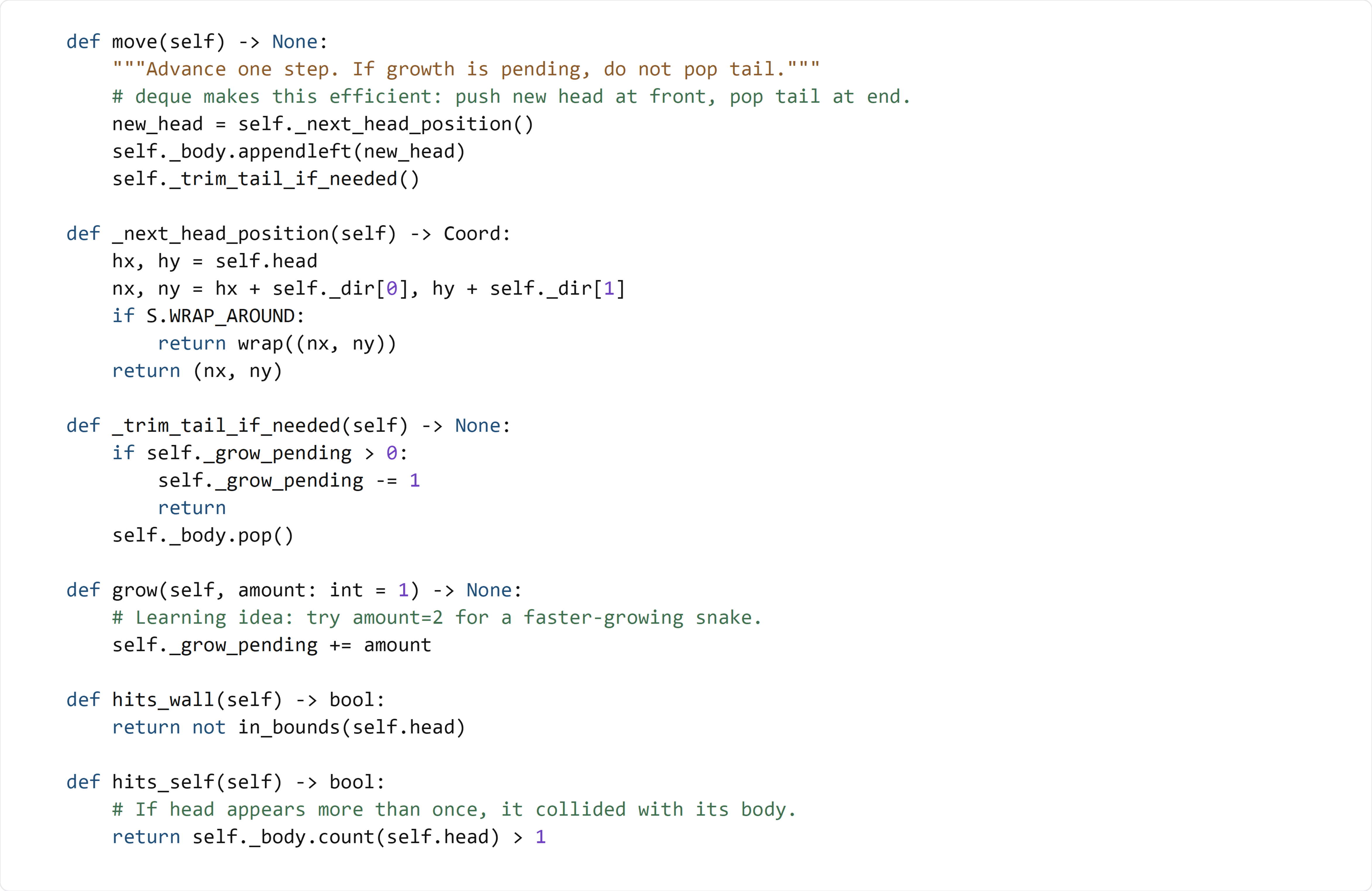
Type this code by hand so you understand how movement and collisions are implemented.
Add these methods inside class Snake directly below occupies:
Detailed Code Review & Key Concepts
move()
- Calls
_next_head_position()to calculate where the snake goes next. - Adds that coordinate to the front of
_body. - Calls
_trim_tail_if_needed()to keep length correct.
This is the core update step used each game tick.
_next_head_position()
- Starts from current
headand adds direction vector. - Applies wrap logic only when
S.WRAP_AROUNDis enabled.
This separates movement math from the rest of update logic.
_trim_tail_if_needed() and grow()
- If growth is pending, decrement counter and skip popping.
- Otherwise pop tail normally.
grow()only updates_grow_pending; it does not directly edit body.
This makes growth deterministic and easy to test.
hits_wall() and hits_self()
hits_wall()reusesin_bounds()helper.hits_self()uses body count ofheadto detect overlap.
These methods provide clear signals for game-over checks.
Test File (s04_test.py)
Use this test file to validate movement, growth, and collision behavior.
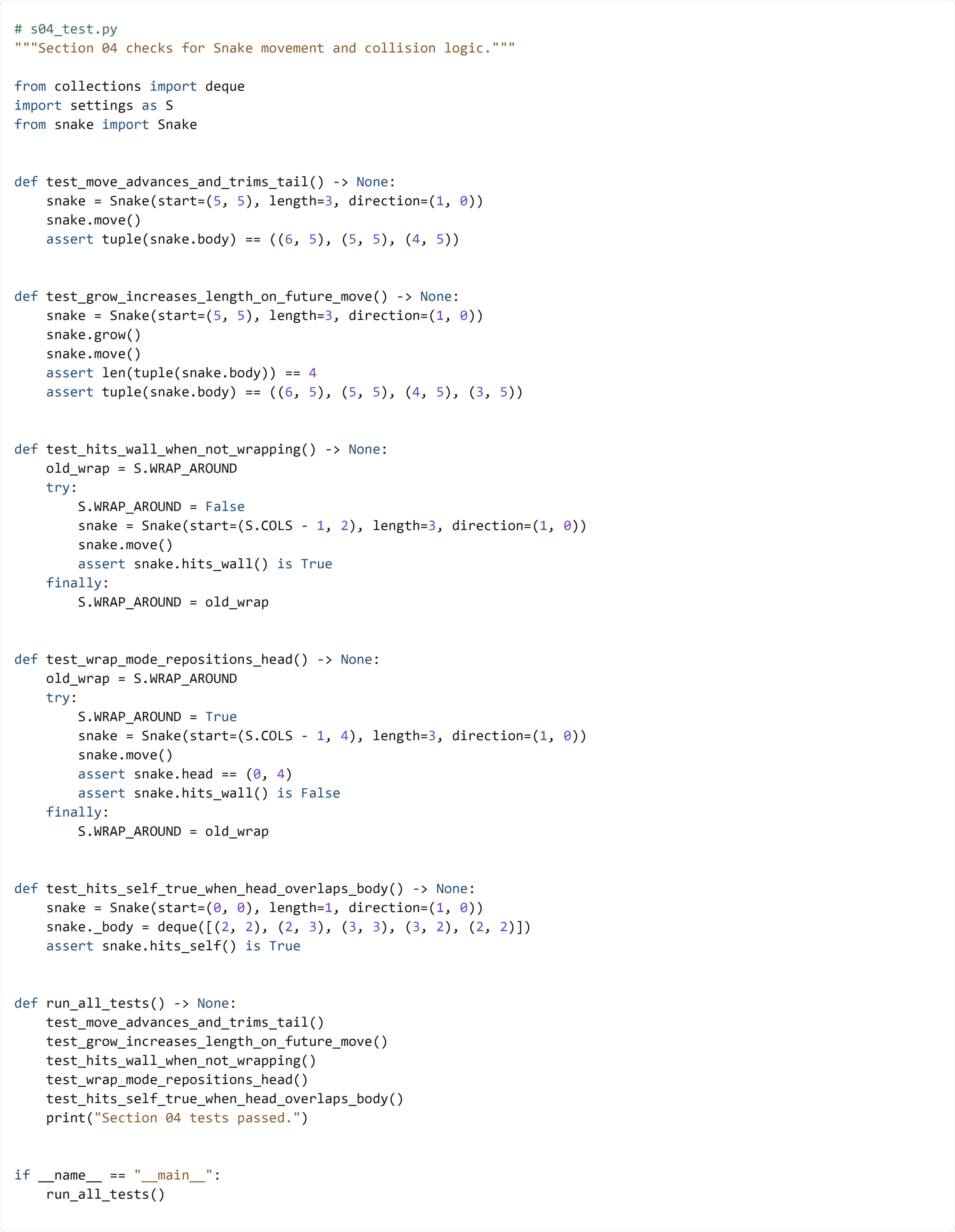
This test file checks the new behavior in focused pieces:
- test_move_advances_and_trims_tail() confirms normal one-step movement.
- test_grow_increases_length_on_future_move() confirms delayed growth logic.
- test_hits_wall_when_not_wrapping() checks out-of-bounds wall detection.
- test_wrap_mode_repositions_head() verifies wrap behavior at the grid edge.
- test_hits_self_true_when_head_overlaps_body() verifies self-collision detection.
Together, these tests confirm the Snake class now owns its movement and collision rules correctly.