🧭 Section 01: Game Configuration First
Section Summary
In this section, students build the settings.py file that controls how the entire Snake game behaves. They will define constants for window size, grid size, speed, colors, and input safety.
By the end of this section, students will understand that game settings belong in one shared file so every class (Game, Snake, Food) can read the same rules.
✅ Checklist
- [ ] Create a new file named
settings.py. - [ ] Add the module docstring explaining this file stores tunable constants.
- [ ] Add window and grid constants:
WINDOW_WIDTH,WINDOW_HEIGHT,TILE_SIZE,COLS,ROWS. - [ ] Add gameplay constants:
FPS,SNAKE_TPS,INITIAL_LENGTH,START_DIR,WRAP_AROUND. - [ ] Add color constants as RGB tuples.
- [ ] Add UI/setup constants:
FONT_NAME,MARGIN. - [ ] Add control safety constant:
KEY_REPEAT_SAFETY. - [ ] Run the section test (
s01_test.py) to verify values.
Core Concepts
1. Why a Shared Settings Module Matters
A settings module gives your whole project a single source of truth. Instead of hard-coding values in multiple files, all classes import from settings.py. This makes the game easier to tune and prevents mismatched behavior.
2. Constants and Naming Style
Values that should stay consistent are written as constants in ALL_CAPS. This is a Python convention that signals: "this value is configuration, not changing game state." It helps students quickly identify setup values.
3. Derived Values (COLS, ROWS)
COLS and ROWS are calculated from the window size and tile size:
- COLS = WINDOW_WIDTH // TILE_SIZE
- ROWS = WINDOW_HEIGHT // TILE_SIZE
The // operator means integer division, so the result is a whole number of grid cells. This is important because snake movement happens cell-by-cell, not pixel-by-pixel.
4. Render Speed vs Movement Speed
FPS controls how often the game redraws the screen. SNAKE_TPS controls how many grid steps the snake takes per second. Keeping these separate teaches students that smooth rendering and gameplay speed are related but different systems.
5. Direction Vectors
START_DIR = (1, 0) represents (dx, dy) movement.
- (1, 0) = move right
- (-1, 0) = move left
- (0, -1) = move up
- (0, 1) = move down
This introduces vector-style movement in a simple tuple form.
6. Rule Toggles
WRAP_AROUND demonstrates a feature toggle:
- False: walls are game-over boundaries.
- True: snake exits one side and appears on the opposite side.
This helps students understand how one setting can change core game rules.
7. Setup Placement Rule
All new constants and setup variables should be added at the top-level settings area of the file, grouped by category (window/grid, gameplay, colors, UI, controls). Do not insert new setup constants in the middle of unrelated logic later.
Code Students Will Type (settings.py)
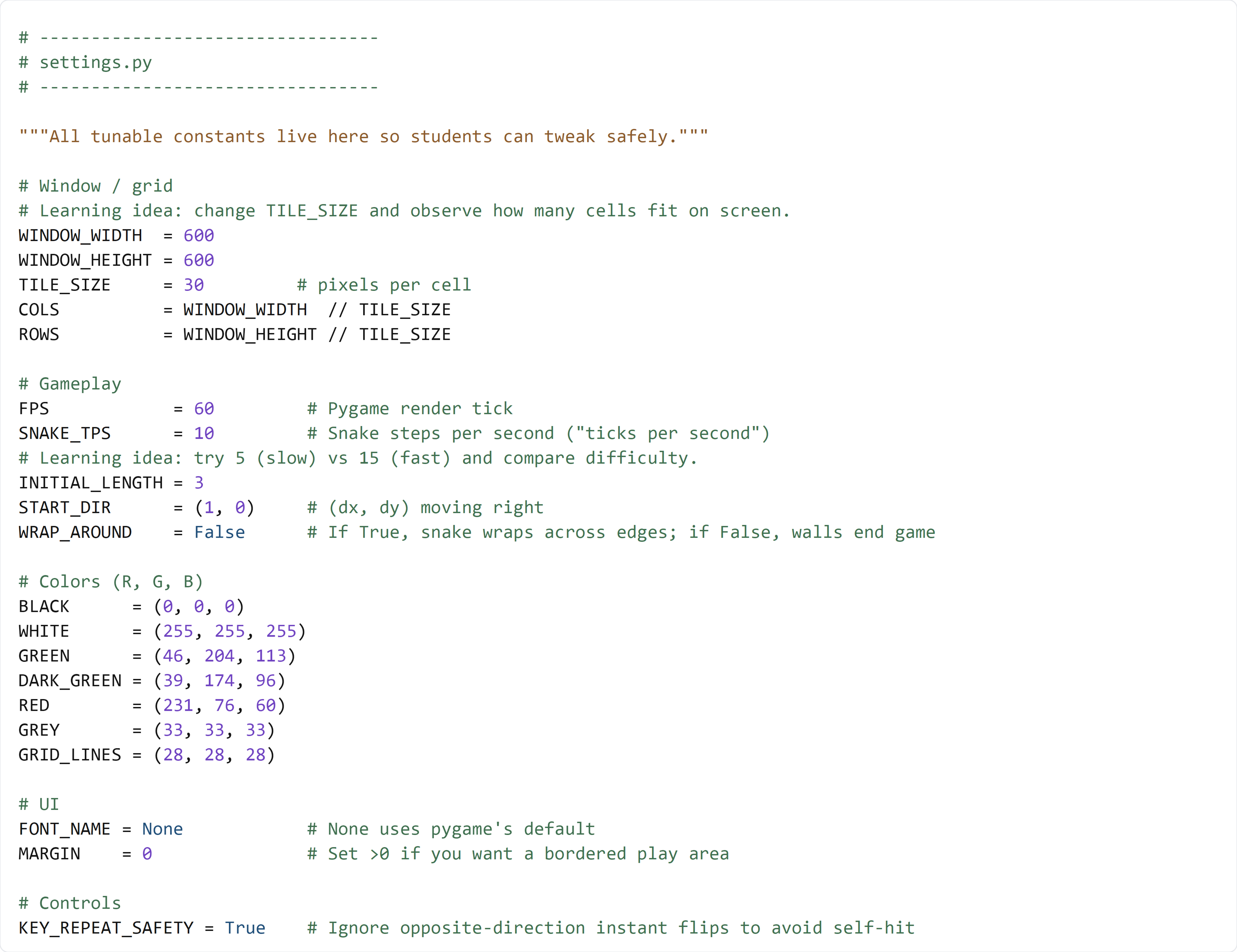
Type this code by hand so you understand each constant and what it controls.
Detailed Code Review & Key Concepts
Window and Grid Block
WINDOW_WIDTHandWINDOW_HEIGHTdefine the pixel size of the window.TILE_SIZEdefines the pixel size of one game cell.COLSandROWSconvert pixel dimensions into grid dimensions.
Why it matters: The snake, food, and collisions all depend on grid coordinates. If this math is wrong, movement and placement will break.
Gameplay Block
FPSkeeps rendering smooth.SNAKE_TPScontrols difficulty by adjusting movement speed.INITIAL_LENGTHsets early-game challenge.START_DIRgives the snake a predictable starting movement.WRAP_AROUNDcontrols boundary behavior.
Why it matters: This block defines the core rules of how the game feels to play.
Colors Block
Each tuple is (R, G, B). Centralizing colors makes visual changes easy and keeps drawing code clean.
Why it matters: Students learn separation of concerns: drawing code should use named constants instead of magic numbers.
UI and Controls Block
FONT_NAMEandMARGINprepare future display/layout customization.KEY_REPEAT_SAFETYsupports input logic that prevents instant reverse turns.
Why it matters: Even in early sections, planning for safe controls and UI options improves architecture quality.
Test File (s01_test.py)
Students can run this quick check to verify the Section 01 configuration is valid.
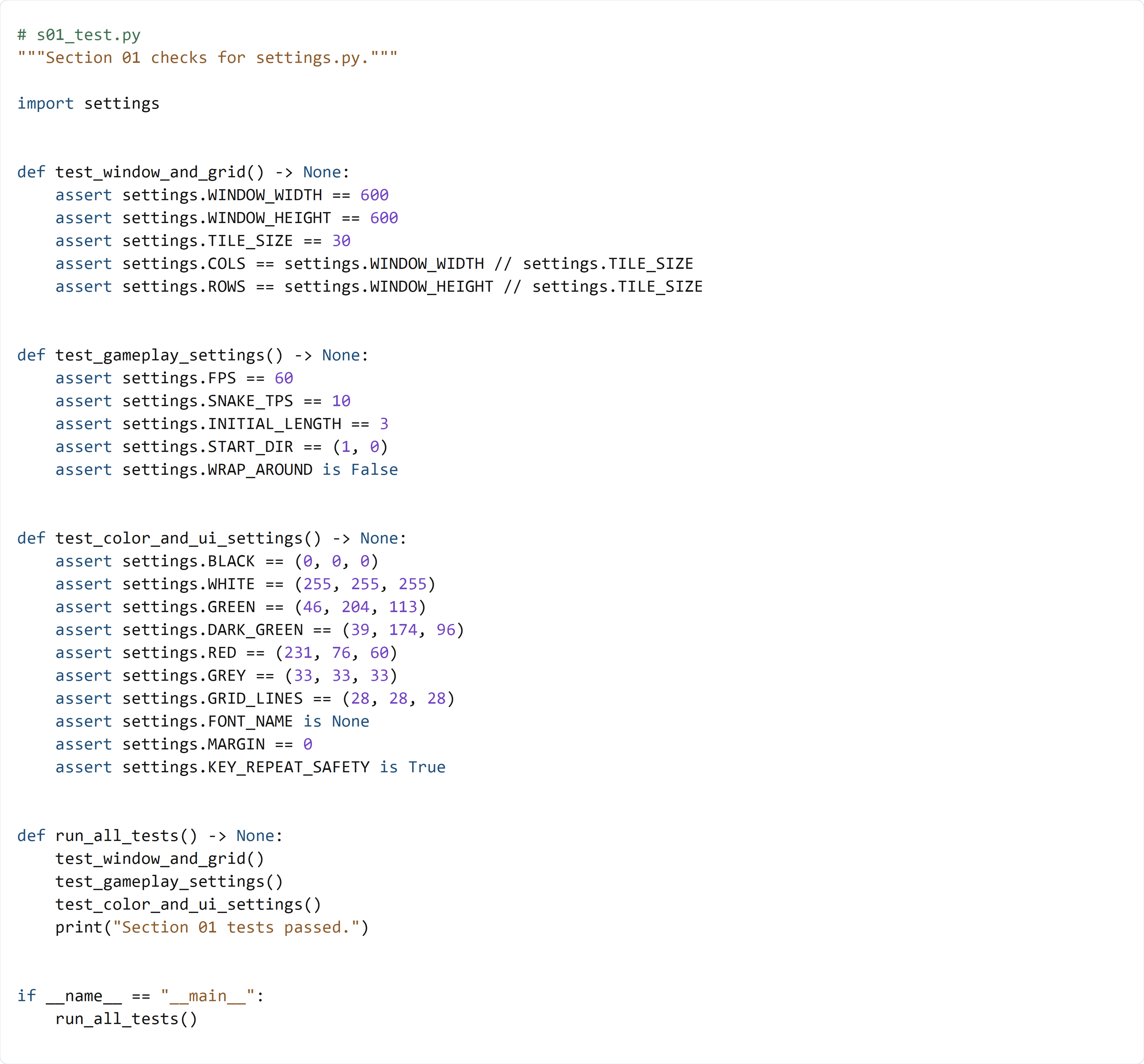
This test file imports settings.py and validates each constant group:
- test_window_and_grid() checks base dimensions and derived grid math.
- test_gameplay_settings() verifies speed and rule toggles.
- test_color_and_ui_settings() confirms color/UI/control defaults.
run_all_tests() runs everything in order, then prints a success message. This gives students a fast confidence check before moving to Section 02.