🔧 Section 02: Shared Grid Utilities
Section Summary
In this section, students create a shared utility module named utils.py for common grid operations. They will build reusable helper functions that multiple classes can import later.
By the end of this section, students will understand how pure helper functions reduce repeated logic and keep OOP classes cleaner.
✅ Checklist
- [ ] Create a new file named
utils.py. - [ ] Add imports and the
Coordtype alias. - [ ] Implement
in_bounds(cell)to validate grid positions. - [ ] Implement
wrap(cell)to wrap positions around edges. - [ ] Implement
random_empty_cell(occupied)to pick a valid free cell. - [ ] Raise
ValueErrorwhen no free cells are available. - [ ] Run
s02_test.pyto verify utility behavior.
Core Concepts
1. Why Utility Functions Matter
A utility module stores shared logic used by many parts of the game. Instead of duplicating grid checks in snake.py, food.py, and game.py, we keep those rules in one place.
2. Pure Functions
in_bounds() and wrap() are pure functions: same input, same output, no side effects. This makes them easier to test and trust.
3. Coordinates and Type Aliases
Coord = Tuple[int, int] gives a readable name to grid coordinates. This improves clarity when passing positions between functions.
4. Bounds vs Wrap Behavior
in_bounds(cell)answers: "Is this coordinate inside the board?"wrap(cell)answers: "If we go past an edge, where do we reappear?"
These support two future gameplay modes: wall collision and wrap-around movement.
5. Fast Occupancy Checks with Sets
random_empty_cell() converts occupied cells to a set because set membership checks are fast. This matters as the snake grows and the number of occupied cells increases.
6. Defensive Programming
If there are no free cells left, random_empty_cell() raises ValueError. This prevents silent bugs and makes edge cases explicit.
Code Students Will Type (utils.py)
Type this code by hand so you understand how each helper works.
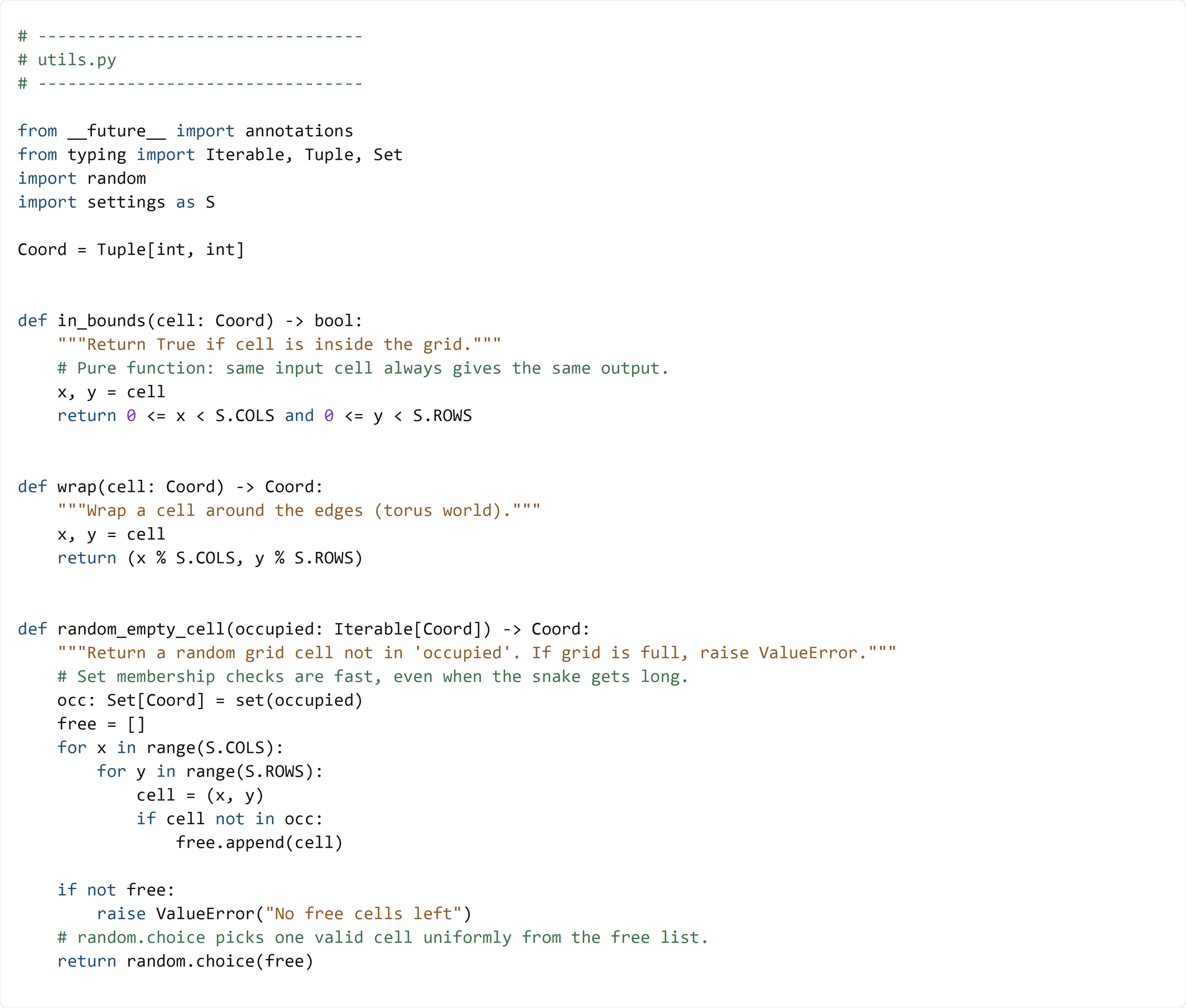
Detailed Code Review & Key Concepts
Imports and Alias
import settings as Sgives access to shared grid values (S.COLS,S.ROWS).Coordmakes function signatures easier to read.
in_bounds(cell)
- Unpacks
(x, y). - Uses chained comparisons to ensure both values are inside valid ranges.
Purpose: validate movement targets and food positions before using them.
wrap(cell)
- Uses modulo (
%) with board dimensions. - Converts off-grid positions into valid wrapped coordinates.
Purpose: supports wrap-around mode without hard-coded edge logic everywhere.
random_empty_cell(occupied)
- Converts
occupiediterable to a set for fast lookup. - Builds a list of all free cells.
- Raises an error if the board is full.
- Returns one random free coordinate.
Purpose: safely spawn food on an empty tile only.
Test File (s02_test.py)
Use this file to test your new helpers.
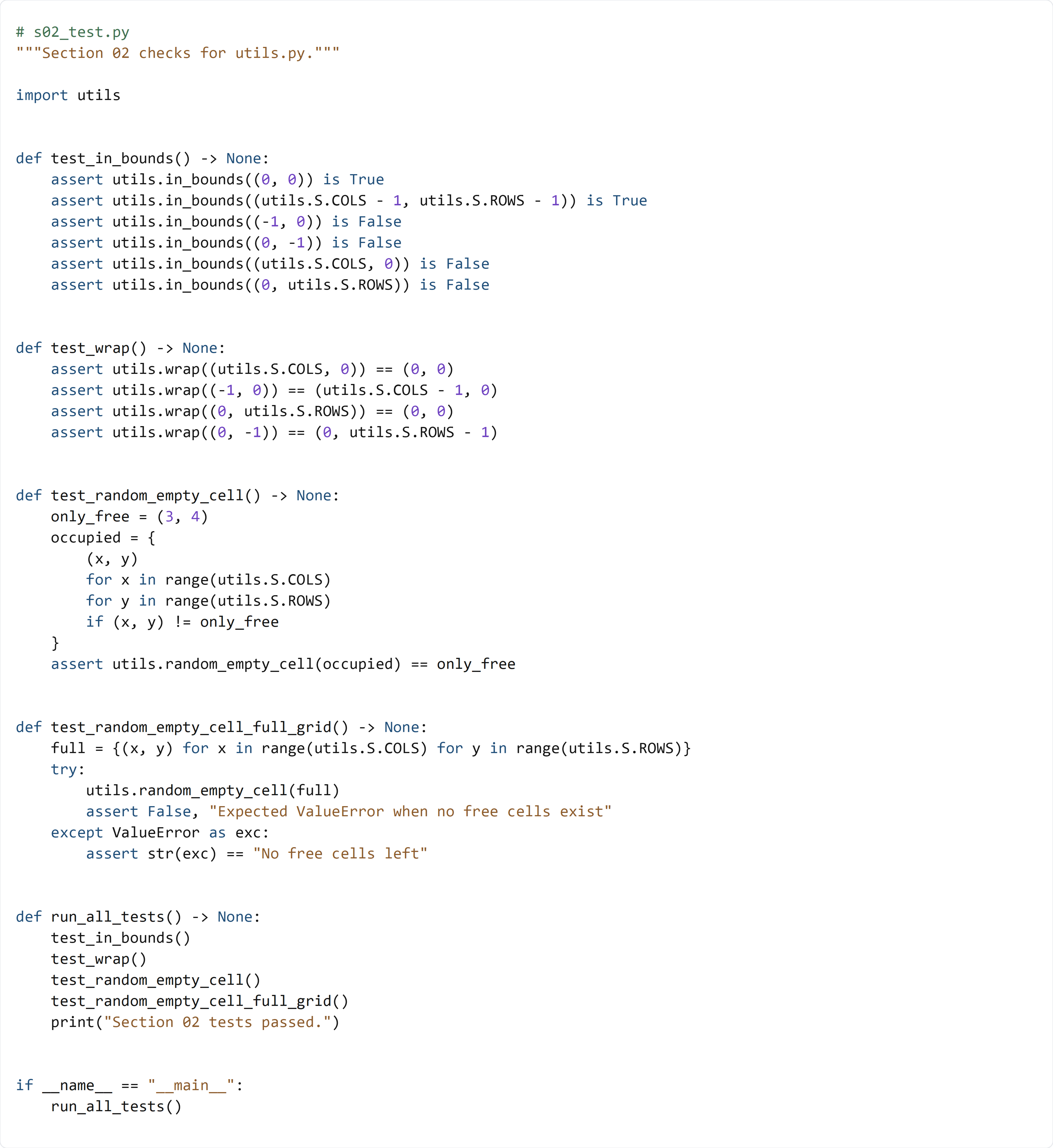
This test file checks each utility behavior directly:
- test_in_bounds() verifies valid and invalid coordinates.
- test_wrap() confirms edge and negative positions wrap correctly.
- test_random_empty_cell() creates a board with exactly one free tile and confirms it is returned.
- test_random_empty_cell_full_grid() confirms the function raises ValueError when no cells are free.
These tests prove the helpers are reliable before you integrate them into game classes.